Intraday
Fast charts and short-term signals, with the hourly trend checked before every entry.
- Quick signals
- Hourly context
Market intelligence before market action
Seven rule-based strategy templates and more than a hundred indicators in one MetaTrader 4 install. Signals never repaint, each one arrives with the evidence to judge it, and the decision to trade stays yours.
Also sold on Amazon.in
Built for traders. Designed for decision-making.
How it works · from data to decision
Market data goes in. Technical analysis processes it, seven strategy templates evaluate the setup, filters mark the weak calls, and a graded signal reaches you. Then Meta Pro 2.0 stops — scroll through the six stages.
01 · Market data
Quotes arrive in MetaTrader 4 as they happen: NSE, F&O and MCX through the Indian data feed, alongside forex, commodities and crypto.
02 · Analysis
Every new price updates the support and resistance zones, the daily pivots, the trend bar and trend strength across timeframes.
03 · Strategy engine
Rule-based templates — price action, breakout, channel scalping, SuperTrend and more — each mark the signals their rules find.
04 · Filtering
Each signal is checked against the zones, the trend bar and its template’s own filter, then graded strong, medium-strong or false.
05 · Signal
What reaches you is a buy or sell with an entry area and a trailing stop-loss line — fixed when the candle closes, never redrawn.
06 · Your decision
Meta Pro 2.0 stops at the signal. Whether to trade, how much, and where to get out are yours to decide, in your own broker’s platform.
01 · Market data
Quotes arrive in MetaTrader 4 as they happen: NSE, F&O and MCX through the Indian data feed, alongside forex, commodities and crypto.
02 · Analysis
Every new price updates the support and resistance zones, the daily pivots, the trend bar and trend strength across timeframes.
03 · Strategy engine
Rule-based templates — price action, breakout, channel scalping, SuperTrend and more — each mark the signals their rules find.
04 · Filtering
Each signal is checked against the zones, the trend bar and its template’s own filter, then graded strong, medium-strong or false.
05 · Signal
What reaches you is a buy or sell with an entry area and a trailing stop-loss line — fixed when the candle closes, never redrawn.
06 · Your decision
Meta Pro 2.0 stops at the signal. Whether to trade, how much, and where to get out are yours to decide, in your own broker’s platform.
Features
What it does for you, and what is on your chart the day it is installed.
Buy and sell arrows on live charts, on any symbol and timeframe your MetaTrader 4 terminal carries.
Once a candle closes its signal is fixed, so what you see on history is what you would have seen live.
Four signal strategies and three study templates, loaded like any MetaTrader template.
Zones, the trend bar and each template’s own filter grade every call strong, medium-strong or false.
A signal that fails its checks stays on the chart with the evidence against it, so you see why it is weak.
A stepped line follows the trend and shows where a trade stops being right.
A price label and a multimeter read the trend from one-minute to daily, beside the chart.
Trend, momentum, oscillators, pivots, market profile and currency strength in one install.
Signal and trend alerts, with strategies, indicators and timeframes tuned to your routine.
Run a template over historical data and refine it before it touches a live trade.
Entry, stop-loss and target printed on the chart, for stocks, commodities and options.
Installed with presets and a step-by-step guide, so your first chart is set up for you.
Strategies
Seven templates read the same market in seven different ways. Their signals meet in one place and are checked before they reach you.
Diagram of how signals move through the templates — not a count of real signals.
On the chart
The Advanced Price Action template on an NSE stock, straight from the user manual. Follow the highlight, or pick a part.
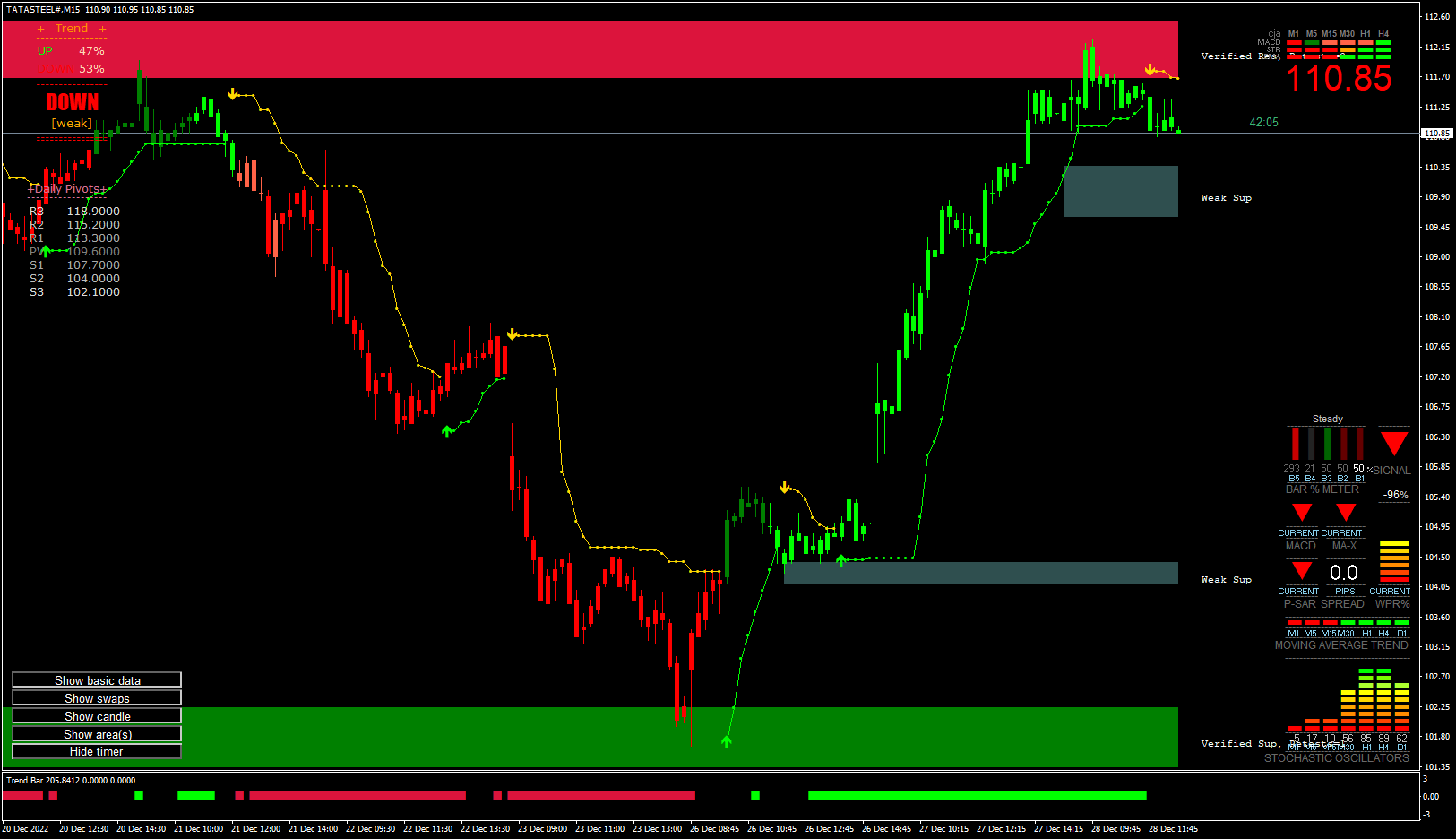
A real Meta Pro 2.0 chart — an NSE stock on the 15-minute timeframe. The chart is a screenshot, not a live feed.
Call filtering
Multi-level signal filtering, designed to reduce weak or lower-quality setups before they reach you.
On the chart you can see the checks at work: the support and resistance zones, the trend bar, each template’s own filter, and the grade every signal is given.
Diagram of multi-level filtering — not a count of real signals, and not a rate.
Illustration of the grading rule on a synthetic price series — not a backtest and not a performance claim. Signal 6 is graded strong and still fails: a grade is a filter, not a forecast.
Fake-call detection
Fake-call detection helps identify signals that do not meet the system’s confirmation criteria. They are graded false and left on the chart beside the evidence against them — the zone they missed, the trend bar that disagrees — so you can see why, and let them pass.
Signals
Every trade follows the same lifecycle, shown here once for a buy and once for a sell. The exit follows the trailing stop-loss line, not a guess.
Illustration on a synthetic price series — not a backtest and not a performance claim. The sell is stopped out early: the trailing line tells you where a trade is wrong, not whether it will work.
Multi-timeframe
The higher timeframe sets the direction, the middle one the structure, the lower one the entry. Meta Pro 2.0’s price label and multimeter read them side by side.
Illustrative timeframes on a synthetic series. Every MetaTrader 4 timeframe, from one-minute to monthly, is available.
Indicators
You don’t need a hundred charts open. The indicators are organised into templates that each answer one question about the market.
Backtesting
Run a template over historical data, study how its signals behaved, adjust the settings and run it again. Because signals never repaint, history shows exactly what live trading would have shown.
Illustration of the workflow on a synthetic series. No backtest results are shown here, because none have been independently verified — yours will come from your own tests.
Markets
Meta Pro 2.0 works on the symbols your MetaTrader 4 terminal receives. Indian markets come through a data feed at ₹500 a month; what you can chart depends on your feed and broker.
Indian markets, through indian data feed: NSE, BSE, NIFTY, Futures, Options, MCX, Currencies.
Global markets, through your mt4 broker: Forex, Commodities, Global exchanges, Crypto.
Which symbols you can chart depends on your data feed and your broker. Meta Pro 2.0 analyses whatever your MetaTrader 4 terminal receives.
Trading styles
Intraday and swing trading run on the same templates. The timeframe changes; the method doesn’t.
Fast charts and short-term signals, with the hourly trend checked before every entry.
The broader trend on four-hour and daily charts, with fewer, slower and more confirmed signals.
Illustrations on synthetic price series. The same templates load on any MetaTrader 4 timeframe.
Alerts and control
Customise strategies, indicators, alerts and timeframes around your own trading workflow. Nothing is placed for you — an alert is a prompt to look.
Illustrative alerts — the symbols and wording are examples. Try the switches.
Screenshots
Genuine MetaTrader 4 charts from the Meta Pro 2.0 user manual — nothing redrawn. Open any of them full size.
Signal strategy
The flagship template, in a full MetaTrader 4 window on the NIFTY 15-minute chart: zones, daily pivots, the trend bar and the multimeter around the signals. It is the template the grading rule is written for.
Who decides
Meta Pro 2.0 is technical analysis and signal software. It never places, sizes or closes an order — every trade is yours, placed in your own broker’s platform.
Meta Pro 2.0 · analysis and signal software
Market data
Prices from your data feed and your broker.
Meta Pro 2.0
Seven templates, running on your MetaTrader 4 chart.
Analysis
Zones, trend and indicators, updated with every price.
Signal
Graded, with a trailing stop-loss line to manage it by.
You · in your broker’s platform
Your decision
Take the trade, or let it pass.
Your order
Placed, sized and closed by you, with your own broker.
Before you buy
Strong signals fail too. The grading tells you which signals the method rates highest — not which will work.
Signals are fixed at the close, but trend strength, the price label and the multimeter describe candles still forming.
A premium can lose most of its value in minutes and expire worthless. A stop-loss protects you only once it is placed with your broker.
If the data feed lags or drops, signals arrive late or not at all. Check it is live before acting.
Trading equities, derivatives, commodities and currencies carries a high level of risk, and leveraged positions can lose more than you put in. X-STOX makes no representation that this software, or any signal it shows, will be profitable. Nothing on this page is financial advice or a recommendation to buy or sell any security. Read the full risk disclosure.
Getting started
Order here or on Amazon.in.
The software, your activation key and a setup guide arrive by e-mail.
Install on your Windows desktop or laptop with MetaTrader 4.
Load the presets, set your alerts, and use installation help whenever you need it.
Pricing
The single licence runs from one IP address; the five-user licence has no IP restriction and can be white-labelled.
For an individual trader
₹18,500
One-time payment · lifetime licence
For teams, educators and businesses
₹49,999
One-time payment · lifetime licence
What you’ll need
Software licences are digital goods — read the refund policy before purchasing. Refund policy
Official product
Meta Pro 2.0 is published by X-STOX Technologies and sold here and on Amazon.in.
Reviews
Reviews left by buyers on Amazon.in, quoted as written.
“It's been a very huge learning experience. Anyone, without any kind of basic knowledge of the share market, can participate.”
Adesh Sharma
Review on Amazon
“This software is easy to install and use. Performance is quite accurate and currently I am very much satisfied.”
Utsav
Review on Amazon
“Very good software. I am very much happy for having this software — perfect level for entry and exit.”
Kishor
Review on Amazon
“I'm trading from last 4 years. X-STOX Meta is the best software.”
Dinesh K
Review on Amazon
FAQ
Explore X-STOX Meta Pro 2.0.
One-time licence · Free lifetime updates · Windows · MetaTrader 4
Enquiry
Tell us what you trade and how. We will tell you whether Meta Pro 2.0 fits — including when it doesn’t.